Skip to Main Content

Bruin Learn access is restored. UCLA Digital and Technology Solutions and Bruin Learn administrators are continuing to monitor for delays or unexpected issues with the restoration of UCLA’s Canvas environment. If you continue to experience any issues with Bruin Learn, please reach out to BruinLearn-Support@it.ucla.edu

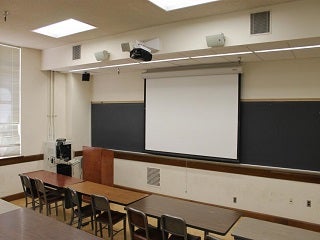
Royce 152

Need help with the classroom AV system? 
Call AVS at (310) 206-6597 or email avs@ucla.edu

Royce-152
Capacity:30
Data Projection:Yes
Classroom Computer:Yes
Video Playback:Input Only
Sound System:Media & XLR Input
Live Stream Capable:Yes
Recording:None
Wireless Network:Yes
Furniture:Fixed

Room Seating Layout

Data Projection

  • A Projector is installed in the ceiling. When activated, it can project either video or data.
  • A Classroom Computer is installed within the media cabinet.
  • A VGA cable is available on the media cabinet for laptop connection.
  • Laptops that have only DVI output will need an adapter to connect to the VGA cable.

Video Playback

  • An auxiliary video input (RCA) is available for video player connection.
  • DVD and/or VHS players are available for checkout from Audio Visual Services.

Internet Access

  • The room is designed for Wireless Network Access for all students and faculty.
  • There is also an Ethernet jack available on the media cabinet for wired connections. Instructors would need to bring their own Ethernet cable and the appropriate adapter for their device.
  • The Classroom Computer has its own wired connection and is already configured to the Classroom network.
  • For instructions on connecting to the Internet with a wired connection, visit the Classroom Network section.

Sound System

  • Wireless lavalier microphones are available for check out, either on a daily or quarterly basis.
  • There is only one microphone input (XLR) at the media cabinet.
  • The Classroom Computer and auxiliary input are already connected to the system for sound support.
  • An audio cable is installed with the VGA cable for laptop support.

Livestream & Web Conference

  • This classroom is equipped with a camera mounted in the ceiling, and it is connected to the installed Classroom Computer. The room’s wireless microphone system also transmits to the computer. A remote control to control the camera is available at the front of the room.
  • By launching a Zoom meeting from the Classroom Computer, the instructor can either live stream a class, record, or both. For more information, please visit the Livestream & Web Conference webpage.