
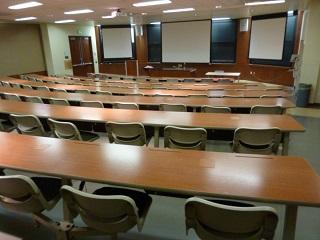
| Capacity: | 95 |
|---|---|
| Video Projection: | Yes |
| Source Options: | HDMI Input, VGA Input, USB-C |
| Sound System: | Voice & Media |
| Live Stream Capable: | Yes |
| BruinCast Recording: | Audio Only |
| Wi-Fi: | Yes |
| Furniture: | Fixed |
Video Projection
- A projector is installed in the room for displaying presentations, video, and other content.
- To find the laptop or device connections available in this classroom, see “Source Options” in the information table above.
- If your device does not support any of these connections, please bring a compatible adapter.
Document Camera
- A document camera is installed at the lab bench.
- The unit can function as either an overhead camera or a transparency projector.
Internet Access
- The room is designed for Wireless Network Access for all students and faculty.
- There is also an Ethernet jack available on the media cabinet for wired connections. Instructors would need to bring their own Ethernet cable and the appropriate adapter for their device.
- For instructions on connecting to the Internet with a wired connection, visit the Classroom Network section.
Sound System
- Wireless lavalier microphones are available for check out, either on a daily or quarterly basis.
- There is one microphone input (XLR) available at the media cabinet.
- An audio cable is installed with the VGA cable for laptop support.
BruinCast Recording
- This classroom is equipped to allow audio podcasting. To request recording services, please visit the BruinCast admin webpage. For questions and information regarding the service, please send an e-mail to bruincasthelp@ucla.edu.