
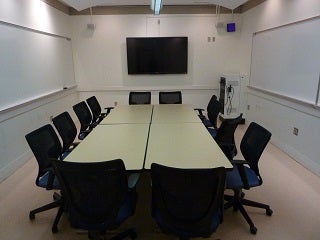
| Capacity: | 12 |
|---|---|
| Video Projection: | Yes |
| Source Options: | HDMI Input, VGA Input |
| Sound System: | Media |
| BruinCast Recording: | None |
| Wi-Fi: | Yes |
| Furniture: | Movable |
Room is not available for use after 5 p.m.
Video Projection
- A projector is installed in the room for displaying presentations, video, and other content.
- To find the laptop or device connections available in this classroom, see “Source Options” in the information table above.
- If your device does not support any of these connections, please bring a compatible adapter.
Internet Access
- The room is designed for Wireless Network Access for all students and faculty.
- There is also an Ethernet jack available on the media cabinet for wired connections. Instructors would need to bring their own Ethernet cable and the appropriate adapter for their device.
- The Classroom Computer has its own wired connection and is already configured to the Classroom network.
- For instructions on connecting to the Internet with a wired connection, visit the Classroom Network section.
Sound System
- The video players are already connected to the system for sound support.
- An audio cable is installed with the VGA cable for laptop support.
- Inputs are present at the media cabinet to plug in additional media devices (cassette players, video cameras, etc.).