
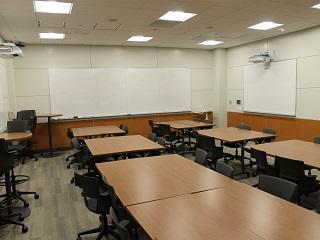
| Capacity: | 44 |
|---|---|
| Video Projection: | Yes |
| Source Options: | HDMI Input, VGA Input |
| Sound System: | Media Only |
| BruinCast Recording: | None |
| Wi-Fi: | Yes |
| Furniture: | Movable |
Room is not available for use after 6pm
Active Learning Classroom
- An HDMI/VGA input for laptops is available at the touch-screen terminals.
- Epson interactive whiteboards allow classes to project media at four unique stations.
- Students can use each interactive whiteboard with touch.
- Students can use HDMI or VGA inputs for laptops to project and share their own media at each interactive whiteboard.
- Classes may arrange seating in either a traditional lecture or group project layout.
- Laptops that have only DVI output will need their own adapter to connect to system using an HDMI/VGA cable.
Video Projection
- A projector is installed in the room for displaying presentations, video, and other content.
- To find the laptop or device connections available in this classroom, see “Source Options” in the information table above.
- If your device does not support any of these connections, please bring a compatible adapter.
Internet Access
- The room is designed for Wireless Network Access for all students and faculty.
Sound System
- HDMI and mini-audio (1/8″) cables are available to connect media devices (laptops, portable devices, media players, etc.).
- There is no voice amplification system available in this room.