
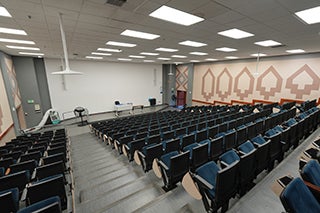
| Capacity: | 296 |
|---|---|
| Video Projection: | Yes |
| Source Options: | USB-C |
| Sound System: | Media |
| Live Stream Capable: | Yes |
| BruinCast Recording: | Video & Audio |
| Wi-Fi: | Yes |
| Furniture: | Fixed |
Video Projection
- A projector is installed in the room for displaying presentations, video, and other content.
- To find the laptop or device connections available in this classroom, see “Source Options” in the information table above.
- If your device does not support any of these connections, please bring a compatible adapter.
Internet Access
- The room is designed for Wireless Network Access for all students and faculty.
Sound System
- Wireless Microphones:
- A lavalier microphone for instructor use and voice amplification is available from the AVS Office as a quarter loan.
- A Catchbox microphone designed to be tossed or passed around the room allowing students to participate with amplified sound is located near the AV credenza.
- Media Audio: Audio from connected devices is automatically amplified through the classroom sound system, whether connected wirelessly or via the installed USB-C cable.
BruinCast Recording
- This classroom is equipped to allow either video recordings and/or audio podcasting. To request recording services, please visit the BruinCast admin webpage. For questions and information regarding the service, please send an e-mail to bruincasthelp@ucla.edu.